Kalimba — a seven-sided body with a septafoil rosette
A kalimba is a lamellophone: tuned metal tines fixed over a bridge on a resonating body, plucked with the thumbs. This repository holds the body — a seven-sided box whose front carries a seven-fold knot rosette.
Seven and seven is the whole idea. The box has seven sides, and the rosette is a septafoil: one continuous ribbon crossing itself seven times, so the sound hole echoes the plan of the thing it is cut into.
The tines, bridge and tuning are not here. Nothing in this file is an instrument on its own.
Get the files
- Download the cut file — the whole body on one sheet.
- Everything as a ZIP — the cut file and this writeup.
- Repository — if you want to change the box or the rosette.
Released under CC0 1.0 — do what you like with them, no attribution needed. The sheet was drawn by Boxes.py, Florian Festi's box generator, which is GPL-3.0-or-later; a drawing it produces is not covered by that licence, and none of Boxes.py is in this repository. Built for LaserMadeMusic.
The rest of the build files — every instrument, generator and tool, indexed.
The sheet
Click the picture to download the cut file. It is a display rendering — the cut file draws a hairline on no background at all, which a browser shows almost invisibly, so this is thickened and painted onto a light ground. Geometry and sheet position are untouched. The three lightest cut-order inks — green, orange and cyan — are darkened in these pictures. At full strength they fall below the contrast a light background can carry, so the cut order could not be read off them. Hue and sequence are unchanged, and the cut files keep the exact values.
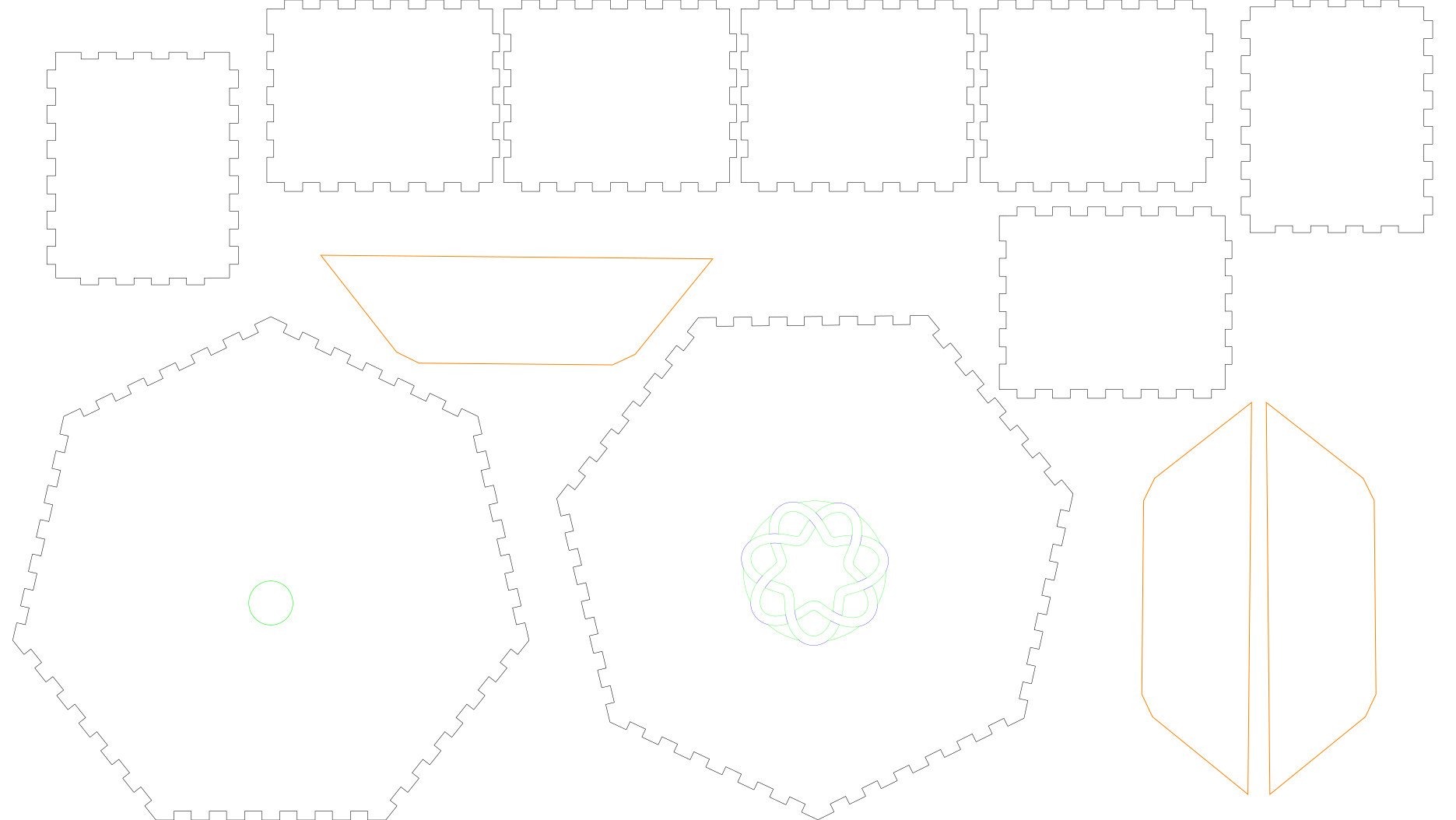 |
| KalimbaSeptaBox.svg · 495 × 279mm sheet |
What is on it
Measured out of the file, not copied from whatever drew it:
| Colour | Part | Count | Size | |
|---|---|---|---|---|
| 1 | blue #0000ff |
rosette interlace and rim lines | 1 | 50.0mm band |
| 2 | green #00ff00 |
the rosette | 1 | 48.5mm across |
| 2 | green #00ff00 |
round hole in the plain face | 1 | 15mm |
| 3 | orange #ff8000 |
reinforcing trapezoids | 3 | 133.3 × 37.3mm each |
| 4 | black #000000 |
face with the rosette | 1 | 175.6 × 171.6mm |
| 4 | black #000000 |
face with the round hole | 1 | 175.6 × 171.2mm |
| 4 | black #000000 |
side panels, finger-jointed | 7 | 79.1 × 65.1mm each |
Sizes are the cut path itself, not its drawn outline — the path is what the laser follows. Seven sides, two faces. The sheet is 495 × 279mm and millimetre-true — 1 user unit = 1 mm with a physical width/height — so it prints and cuts at real size. Nothing hangs off it: the parts that appear to touch the top and bottom edges are sitting exactly on them, and the 0.07mm you may measure past is the drawn stroke, half of a 0.14mm line.
Colour is the order, and blue is not a cut
Run them blue, green, orange, black — engrave first, then cut outward from the detail to the outlines. Outlines last is the usual reason: once a cut frees a part, anything still to be cut inside it can move.
That sequence is shared by every LaserMadeMusic repository: blue engraves, then green → orange → cyan → black, with black always the cut that frees the part and violet meaning skip. This sheet uses four of the five — there is no cyan stage and nothing to skip.
The blue is an engrave. Those lines are the rosette's over/under interlace hints and the short continuations carrying the ribbon's edges across the rim. They run across the ribbon, so cutting them severs it and the rosette comes apart as it leaves the machine. Give them a score or engrave operation, or delete the layer.
Give every colour you keep an explicit operation. A per-colour job silently skips any colour you leave unmapped — leave the black unmapped and you will engrave a rosette and cut no parts.
The three orange trapezoids are optional
They glue underneath the top sheet of the heptagon to stiffen it, and the build stands up without them. Cut them if you want the face stronger — worth considering, since that face has the rosette cut out of it — and skip the orange stage entirely if you do not.
The rosette
One self-crossing ribbon with seven crossings, 48.5mm across. It is a cut-out: the removed material is the open area and the ribbon is what stays, and the ribbon's peaks deliberately overrun the rim so the rosette fuses into the face rather than dropping out when the last cut closes. There is no continuous rim circle in the cut layer, and that is correct — adding one drops the rosette on the floor.
The knotwork sound holes repository documents this family in full and generates any coprime leads × bights, if you want a different fold count for a differently sided box.
Before you cut
Cut it in 3mm Baltic birch plywood. That is what this is built in, and it is what the finger joints are sized for. Finger joints do not tolerate being cut in stock they were not sized for — too thin and they rattle, too thick and they will not go together — so if you substitute anything else, the joints have to be regenerated for it rather than merely scaled. Boxes.py is the route: its RegularBox generator draws an n-sided finger-jointed box and cuts the fingers for whatever --thickness you give it. Boxes.py is Florian Festi's, and is GPL-3.0-or-later — it is not included here, and the sheet below is something it drew rather than any part of it.
boxes --generator RegularBox --n 7 --radius_bottom 91 --h 65 \
      --thickness 4 --top closed --output heptagon.svg
That is a seven-sided body in 4mm stock. It is not this sheet — --radius_bottom is an inner radius measured at the corners, so the panel sizes come out near these rather than equal to them, and you will want to check them against the table above before cutting. The rosette is not part of it either; cut that separately into the face.
No acoustic claim is made. A kalimba body is a resonator; how it sounds depends on how well the box closes and on the tines, neither of which these files decide.
The rosette removes a good half of its disc from a face that also has to hold the box square. Consider that before choosing a thin material.
Files
KalimbaSeptaBox.svg |
the whole body — seven sides, two faces, rosette |
previews/ |
display rendering — not a cut file |
kalimba-3d.html |
the 3D view, assembled from the cut files — drag to turn |
viewer.py |
builds kalimba-3d.html from the cut files, with the turn3d module in lasermade-tools |
.repro |
how every shipped drawing and page is reproduced |
index.md · index.html |
this page; the markdown is the source |